Introduction
WordPress plugins provide powerful ways to extend website functionality. Developers use plugins to create contact forms, membership systems, payment integrations, image galleries, product management tools, custom dashboards, and many other features.
However, plugins that interact with databases can introduce serious security vulnerabilities when database queries are not handled correctly.
One of the most important vulnerabilities developers must understand is SQL injection.
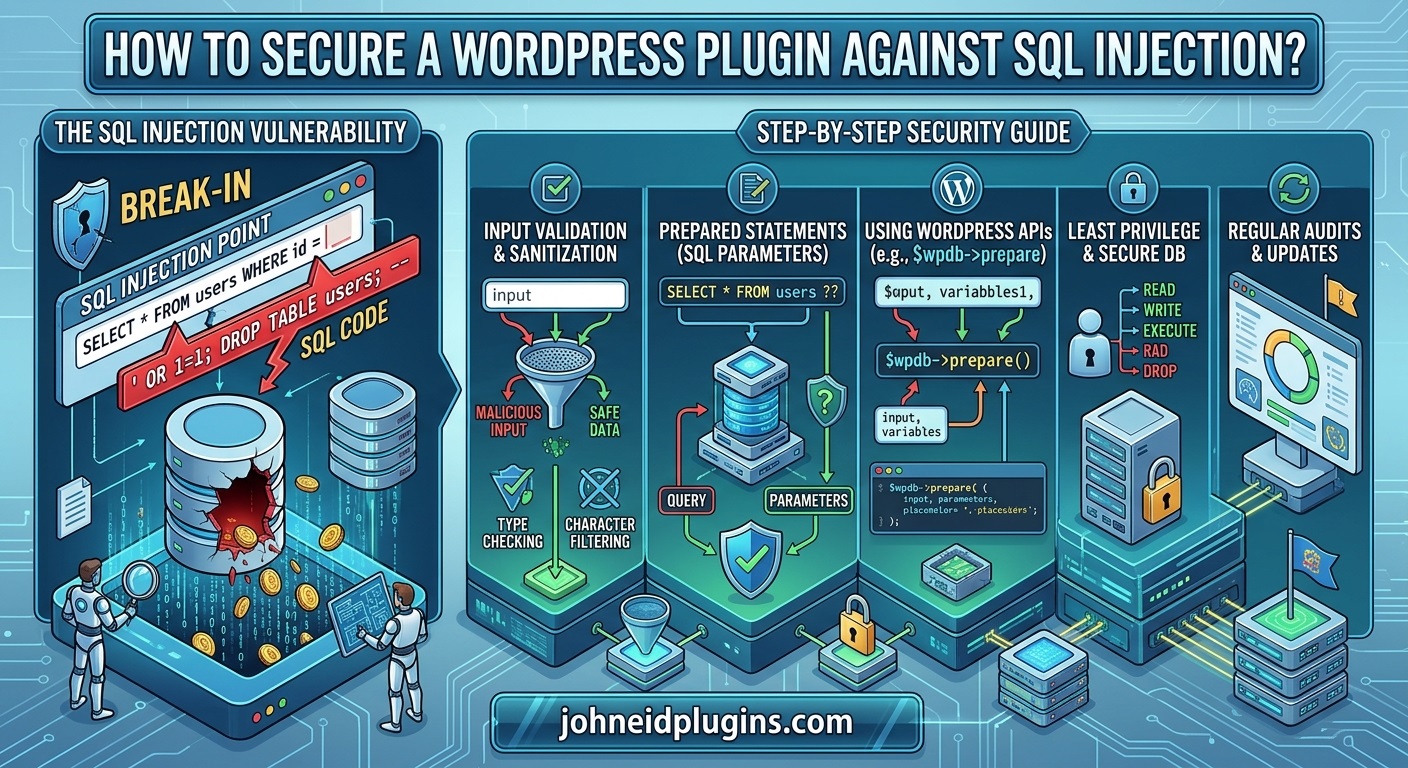
SQL injection occurs when an attacker manipulates database queries by supplying unexpected input that is interpreted as part of an SQL statement. If a WordPress plugin inserts untrusted data directly into a database query, an attacker may be able to change the intended query and access or modify information without authorization.
Depending on the vulnerability and database permissions, SQL injection can expose sensitive information, modify database records, bypass certain application checks, or damage website data.
For example, imagine a WordPress plugin that allows visitors to search for products, articles, or customer records. If the plugin directly inserts the visitor’s search term into an SQL query without using appropriate protections, an attacker may manipulate the query to retrieve information beyond the intended search results.
The good news is that WordPress provides database APIs and security functions that help developers prevent these problems.
Developers can significantly reduce SQL injection risks by using $wpdb->prepare(), validating user input, applying appropriate sanitization, avoiding unsafe SQL concatenation, restricting database permissions, and following secure coding practices.
This guide explains how to secure a WordPress plugin against SQL injection, with practical PHP examples and recommendations for both beginner and experienced plugin developers.
You will learn how SQL injection works, where vulnerabilities commonly occur, how to use WordPress database functions correctly, and how to test your plugin before distributing it.
1. Understand What SQL Injection Is
SQL injection is a security vulnerability that occurs when untrusted input is incorporated into an SQL query in a way that allows the input to change the query’s intended structure or behavior.
WordPress stores website information in a database, including:
- Posts and pages.
- User accounts.
- Comments.
- Plugin settings.
- Product information.
- Custom post type records.
- Metadata.
- Membership information.
- Transaction-related records.
Plugins frequently retrieve, insert, update, and delete database information.
If a plugin constructs SQL queries using unsafe user input, attackers may attempt to manipulate those queries.
A Simple Example of SQL Injection
Consider a plugin that searches for a user by username.
An unsafe implementation might look like this:
global $wpdb;

$username = $_GET['username'];

$query = "SELECT * FROM {$wpdb->users}
          WHERE user_login = '$username'";

$results = $wpdb->get_results( $query );
The problem is that the value of $username is inserted directly into the SQL statement.
An attacker may provide specially crafted input containing SQL syntax rather than an ordinary username.
This can change the meaning of the database query.
The fundamental problem is not that the visitor supplied unusual text. The problem is that the plugin allowed external input to become part of the SQL command itself.
Why SQL Injection Is Dangerous
Depending on the vulnerable query and the database user’s privileges, SQL injection can potentially allow attackers to:
- Retrieve information that should not be publicly accessible.
- Access sensitive user-related information.
- Modify existing database records.
- Delete or corrupt stored information.
- Manipulate application behavior.
- Bypass certain database-level restrictions.
- Obtain information that can support further attacks.
Not every SQL injection vulnerability provides all these capabilities. The impact depends on the vulnerable query, database configuration, and application permissions.
For WordPress plugin developers, preventing SQL injection should be a fundamental part of database programming.
2. Understand How WordPress Plugins Interact With Databases
WordPress provides a database abstraction class called $wpdb.
It allows developers to perform common database operations without writing separate database connection code.
For example:
global $wpdb;This makes the WordPress database object available within the current function.
Some commonly used $wpdb methods include:
| Function | Purpose |
|---|---|
$wpdb->get_results() | Retrieves multiple database records |
$wpdb->get_row() | Retrieves a single database row |
$wpdb->get_var() | Retrieves a single database value |
$wpdb->query() | Executes an SQL query |
$wpdb->insert() | Inserts a database record |
$wpdb->update() | Updates database records |
$wpdb->delete() | Deletes database records |
$wpdb->prepare() | Safely prepares SQL queries with placeholders |
These functions are useful when developing plugins that need database functionality.
However, using $wpdb does not automatically make every database query secure.
Developers must use its methods correctly and ensure that untrusted values cannot alter SQL query structure.
The official WordPress Database API documentation provides detailed information about database operations.
3. Use $wpdb->prepare() to Prevent SQL Injection
One of the most important ways to secure WordPress database queries is to use $wpdb->prepare().
This function prepares SQL statements by substituting values into the appropriate placeholders.
Instead of directly inserting user input into an SQL query, developers define the query structure and supply the data separately.
Incorrect Database Query
Consider this example:
global $wpdb;

$username = $_GET['username'];

$query = "SELECT * FROM {$wpdb->users}
          WHERE user_login = '$username'";

$results = $wpdb->get_results( $query );
This implementation is unsafe because the username is directly inserted into the query.
Correct Database Query
Rewrite the query using $wpdb->prepare():
global $wpdb;

$username = isset( $_GET['username'] )
    ? sanitize_text_field( wp_unslash( $_GET['username'] ) )
    : '';

$query = $wpdb->prepare(
    "SELECT * FROM {$wpdb->users}
     WHERE user_login = %s",
    $username
);

$results = $wpdb->get_results( $query );
Here, %s is a placeholder for a string value.
The important difference is that the username is treated as data rather than SQL syntax.
Understand WordPress SQL Placeholders
WordPress supports several important placeholders:
| Placeholder | Data type |
|---|---|
%s | String |
%d | Integer |
%f | Floating-point number |
%i | Identifier, such as a table or column name (WordPress 6.2+) |
For example, a plugin that retrieves a post using its ID can use:
global $wpdb;

$post_id = 25;

$query = $wpdb->prepare(
    "SELECT * FROM {$wpdb->posts}
     WHERE ID = %d",
    $post_id
);

$post = $wpdb->get_row( $query );
For an email address:
global $wpdb;

$email = 'user@example.com';

$query = $wpdb->prepare(
    "SELECT * FROM {$wpdb->users}
     WHERE user_email = %s",
    $email
);

$user = $wpdb->get_row( $query );
Using appropriate placeholders helps ensure that values are handled correctly.
Important: Do not put quotation marks around placeholders in the SQL query. WordPress handles the required quoting.
For additional information, review the official wpdb::prepare() reference.
4. Never Concatenate Untrusted Input Into SQL Queries
One of the most common mistakes in plugin development is combining SQL statements with variables containing user-supplied information.
For example:
$query = "SELECT * FROM {$wpdb->posts}
          WHERE post_title = '" . $_GET['title'] . "'";
This is unsafe because external input is directly concatenated into the SQL statement.
The same problem can occur with:
- Search fields.
- URL parameters.
- Form submissions.
- AJAX requests.
- REST API parameters.
- Cookies.
- Imported external information.
- Data stored by another plugin.
Developers should never assume that information is trustworthy simply because it comes from their own website.
Even logged-in administrators can unintentionally submit unexpected values, and stored information may have originated from an untrusted source.
Use Prepared Queries Instead
A safer implementation is:
global $wpdb;

$title = isset( $_GET['title'] )
    ? sanitize_text_field( wp_unslash( $_GET['title'] ) )
    : '';

$query = $wpdb->prepare(
    "SELECT * FROM {$wpdb->posts}
     WHERE post_title = %s",
    $title
);

$posts = $wpdb->get_results( $query );
This separates the SQL statement from the supplied value.
A good development rule is simple:
Never construct SQL queries by directly concatenating untrusted input.
5. Validate and Sanitize User Input Before Database Operations
Prepared statements are essential, but secure plugin development requires more than preparing SQL queries.
Developers should also validate and sanitize incoming data.
These processes help ensure that information meets the application’s requirements before it is processed or stored.
Understand Input Validation
Validation checks whether supplied information meets specific requirements.
For example, if a plugin expects a numeric product ID, accepting arbitrary text is unnecessary.
You can validate an integer using:
$product_id = isset( $_POST['product_id'] )
    ? absint( wp_unslash( $_POST['product_id'] ) )
    : 0;

if ( $product_id <= 0 ) {
    return;
}
This ensures that the value is converted into a non-negative integer.
For other types of input, use appropriate validation rules.
Understand Input Sanitization
Sanitization removes or transforms unwanted characters according to the expected data type.
WordPress provides useful sanitization functions:
| Function | Recommended use |
|---|---|
sanitize_text_field() | General text |
sanitize_email() | Email addresses |
sanitize_key() | Keys and identifiers |
absint() | Non-negative integers |
sanitize_title() | Slugs |
esc_url_raw() | URLs intended for storage |
For example:
$search_term = isset( $_POST['search_term'] )
    ? sanitize_text_field(
        wp_unslash( $_POST['search_term'] )
    )
    : '';
Sanitization is not a replacement for prepared SQL statements.
Even sanitized input should be passed into SQL queries through appropriate placeholders.
The WordPress Data Validation documentation explains these practices in greater detail.
6. Secure WordPress Search Queries
Search functionality is a common area where SQL injection vulnerabilities can occur.
Plugins often provide custom search boxes for finding posts, products, users, or other records.
If search terms are inserted directly into database queries, attackers may attempt to manipulate the SQL statement.
Avoid Unsafe Search Queries
An unsafe implementation might look like this:
global $wpdb;

$search = $_GET['search'];

$query = "SELECT * FROM {$wpdb->posts}
          WHERE post_title LIKE '%$search%'";

$results = $wpdb->get_results( $query );
The search term is directly inserted into the query.
Use esc_like() and prepare()
WordPress provides the $wpdb->esc_like() method to escape SQL wildcard characters when constructing LIKE patterns.
Use it together with $wpdb->prepare():
global $wpdb;

$search = isset( $_GET['search'] )
    ? sanitize_text_field( wp_unslash( $_GET['search'] ) )
    : '';

$like = '%' . $wpdb->esc_like( $search ) . '%';

$query = $wpdb->prepare(
    "SELECT * FROM {$wpdb->posts}
     WHERE post_title LIKE %s",
    $like
);

$results = $wpdb->get_results( $query );
This approach protects the query structure while preserving the intended search behavior.
The distinction matters: esc_like() handles SQL wildcard characters, while prepare() safely handles the value in the SQL statement.
7. Use WordPress Database Functions Instead of Writing Raw SQL
Another effective way to reduce SQL injection risks is to use existing WordPress functions whenever possible.
Many common database operations do not require custom SQL queries.
For example, instead of manually inserting information into the wp_postmeta table, use:
update_post_meta(
    $post_id,
    'plugin_custom_field',
    $value
);
To retrieve the information:
$value = get_post_meta(
    $post_id,
    'plugin_custom_field',
    true
);
To save plugin settings:
update_option(
    'my_plugin_settings',
    $settings
);
To retrieve plugin settings:
$settings = get_option(
    'my_plugin_settings',
    array()
);
WordPress provides dedicated APIs for posts, users, metadata, options, comments, and other common operations.
These functions reduce the need for manually constructed SQL queries and generally make plugins easier to maintain.
For example, if your plugin only needs to retrieve published posts, consider using WP_Query instead of writing a custom SQL statement.
$args = array(
    'post_type'      => 'post',
    'post_status'    => 'publish',
    'posts_per_page' => 10,
);

$query = new WP_Query( $args );
This approach uses WordPress’s existing query system.
The official WordPress Plugin Developer Handbook provides guidance on using WordPress APIs instead of unnecessarily creating custom database operations.
8. Secure Dynamic Table Names and Column Names
A common misunderstanding about prepared SQL queries is that every part of an SQL statement can be replaced with a placeholder.
This is not correct.
Placeholders such as %s, %d, and %f are designed for data values. They cannot be used as ordinary substitutes for table names, column names, or SQL keywords.
Consider this example:
global $wpdb;

$table = $_GET['table'];

$query = $wpdb->prepare(
    "SELECT * FROM %s",
    $table
);
This is incorrect because %s represents a string value, not an SQL table identifier.
Use Fixed Identifiers Whenever Possible
The safest approach is to define table names in your plugin code.
For example:
global $wpdb;

$table = $wpdb->prefix . 'my_plugin_data';

$query = $wpdb->prepare(
    "SELECT * FROM {$table} WHERE id = %d",
    10
);

$results = $wpdb->get_results( $query );
Here, the table name is constructed from trusted plugin code, while the ID is passed through a placeholder.
Use Identifier Placeholders When Supported
WordPress 6.2 and later support %i for SQL identifiers.
For example:
global $wpdb;

$table = $wpdb->prefix . 'my_plugin_data';

$query = $wpdb->prepare(
    "SELECT * FROM %i WHERE id = %d",
    $table,
    10
);

$results = $wpdb->get_results( $query );
However, safely quoting an identifier does not mean that an arbitrary table name should be accepted from a visitor.
If users can choose between different tables or columns, use an explicit allowlist of permitted identifiers.
For example:
$allowed_columns = array(
    'name'  => 'name',
    'date'  => 'created_at',
    'price' => 'price',
);

$requested_column = isset( $_GET['sort'] )
    ? sanitize_key( wp_unslash( $_GET['sort'] ) )
    : 'date';

$sort_column = isset( $allowed_columns[ $requested_column ] )
    ? $allowed_columns[ $requested_column ]
    : 'created_at';
This ensures that the selected column comes from a predefined list rather than arbitrary user input.
9. Secure SQL Queries That Use Sorting and Filtering
Custom sorting and filtering functionality is another area where SQL injection can occur.
For example, a product management plugin might allow users to sort products by:
- Product name.
- Price.
- Publication date.
- Stock quantity.
An unsafe implementation might look like this:
$orderby = $_GET['orderby'];

$query = "SELECT * FROM {$table}
          ORDER BY $orderby";
The problem is that the requested sorting value becomes part of the SQL query.
An attacker may attempt to supply unexpected SQL syntax.
Use an Allowlist for Sorting
Instead of accepting arbitrary sorting values, define permitted options.
$allowed_orderby = array(
    'name'  => 'product_name',
    'price' => 'product_price',
    'date'  => 'created_at',
);

$requested = isset( $_GET['orderby'] )
    ? sanitize_key( wp_unslash( $_GET['orderby'] ) )
    : 'date';

$orderby = isset( $allowed_orderby[ $requested ] )
    ? $allowed_orderby[ $requested ]
    : 'created_at';
Now define the sorting direction:
$direction = isset( $_GET['order'] )
    ? strtoupper( sanitize_text_field(
        wp_unslash( $_GET['order'] )
    ) )
    : 'DESC';

if ( ! in_array( $direction, array( 'ASC', 'DESC' ), true ) ) {
    $direction = 'DESC';
}
Finally, construct the query:
global $wpdb;

$query = $wpdb->prepare(
    "SELECT * FROM {$table}
     WHERE status = %s
     ORDER BY {$orderby} {$direction}
     LIMIT %d",
    'active',
    20
);

$results = $wpdb->get_results( $query );
In this example, the column and direction are selected from application-controlled values, while the status and limit are supplied through placeholders.
This distinction is important because SQL keywords and identifiers cannot be treated like ordinary parameter values.
10. Secure AJAX Requests That Access the Database
Many WordPress plugins use AJAX to perform background operations without reloading the page.
For example, an image gallery plugin might use AJAX to retrieve images, while a product management plugin might use it to search database records.
If AJAX requests are not properly protected, attackers may attempt to exploit vulnerable database queries.
Register an AJAX Handler
Consider a plugin that searches for a product using an AJAX request.
A simplified implementation might look like this:
add_action(
    'wp_ajax_mfp_search_products',
    'mfp_search_products'
);

function mfp_search_products() {

    check_ajax_referer(
        'mfp_search_nonce',
        'nonce'
    );

    if ( ! current_user_can( 'manage_options' ) ) {
        wp_send_json_error(
            array( 'message' => 'Unauthorized request.' ),
            403
        );
    }

    $search = isset( $_POST['search'] )
        ? sanitize_text_field(
            wp_unslash( $_POST['search'] )
        )
        : '';

    global $wpdb;

    $like = '%' . $wpdb->esc_like( $search ) . '%';

    $query = $wpdb->prepare(
        "SELECT ID, post_title
         FROM {$wpdb->posts}
         WHERE post_type = %s
         AND post_status = %s
         AND post_title LIKE %s
         LIMIT %d",
        'product',
        'publish',
        $like,
        20
    );

    $results = $wpdb->get_results( $query );

    wp_send_json_success( $results );
}
This example includes several security measures:
- Nonce verification.
- User capability checking.
- Input sanitization.
- SQL wildcard handling.
- Prepared database queries.
- A result limit.
Understand the Difference Between Nonces and SQL Injection Protection
A WordPress nonce helps protect against certain forged requests, including cross-site request forgery.
However, a nonce does not prevent SQL injection.
Similarly, checking whether a user has administrative permissions does not make an unsafe SQL query secure.
These are separate security controls and should be implemented together where appropriate.
Also, if your plugin provides public AJAX functionality, do not automatically require administrator permissions. Instead, define the correct authorization rules for the intended audience and protect the database query independently.
Read the WordPress AJAX documentation for additional implementation guidance.
11. Secure WordPress REST API Database Operations
Modern WordPress plugins frequently use REST API endpoints to communicate with frontend applications, mobile applications, and external services.
For example, a plugin might provide an endpoint that retrieves customer records or product information.
If REST API parameters are passed directly into SQL queries, the endpoint may introduce SQL injection vulnerabilities.
Register a REST API Endpoint Securely
A simplified example:
add_action(
    'rest_api_init',
    function () {

        register_rest_route(
            'mfp/v1',
            '/products',
            array(
                'methods'  => 'GET',
                'callback' => 'mfp_get_products',
                'permission_callback' => function () {
                    return current_user_can( 'manage_options' );
                },
                'args' => array(
                    'search' => array(
                        'sanitize_callback' => 'sanitize_text_field',
                    ),
                ),
            )
        );

    }
);
The callback can retrieve the submitted search value and prepare the SQL query:
function mfp_get_products( WP_REST_Request $request ) {

    global $wpdb;

    $search = $request->get_param( 'search' );

    $search = is_string( $search ) ? $search : '';

    $like = '%' . $wpdb->esc_like( $search ) . '%';

    $query = $wpdb->prepare(
        "SELECT ID, post_title
         FROM {$wpdb->posts}
         WHERE post_type = %s
         AND post_title LIKE %s
         LIMIT %d",
        'product',
        $like,
        20
    );

    $results = $wpdb->get_results( $query );

    return rest_ensure_response( $results );
}
This example demonstrates the separation of REST API request handling and database query construction.
For production plugins, also consider response permissions, data exposure, argument validation, pagination limits, and appropriate error handling.
The WordPress REST API Handbook provides further information about registering secure endpoints.
12. Secure Custom Database Tables
Some plugins need their own database tables.
For example, an analytics plugin might store visitor statistics, while an inventory plugin might maintain custom stock records.
WordPress provides database functions that can help developers create and manage plugin-specific tables.
Use the WordPress Database Prefix
Never assume that every WordPress website uses the default wp_ database prefix.
Instead, use:
global $wpdb;

$table_name = $wpdb->prefix . 'mfp_records';
This allows your plugin to work with installations that use customized database prefixes.
Create Tables Using dbDelta()
WordPress provides the dbDelta() function for creating or updating database table structures.
For example:
function mfp_create_database_table() {

    global $wpdb;

    $table_name = $wpdb->prefix . 'mfp_records';

    $charset_collate = $wpdb->get_charset_collate();

    $sql = "CREATE TABLE $table_name (
        id bigint(20) unsigned NOT NULL AUTO_INCREMENT,
        record_name varchar(255) NOT NULL,
        record_value text NOT NULL,
        PRIMARY KEY  (id)
    ) $charset_collate;";

    require_once ABSPATH . 'wp-admin/includes/upgrade.php';

    dbDelta( $sql );

}
You can run this function during plugin activation:
register_activation_hook(
    __FILE__,
    'mfp_create_database_table'
);
The table name and schema in this example are controlled by the plugin rather than supplied by visitors.
When inserting information into the custom table, use prepared queries or the appropriate $wpdb methods.
For example:
global $wpdb;

$table_name = $wpdb->prefix . 'mfp_records';

$wpdb->insert(
    $table_name,
    array(
        'record_name'  => 'Example Record',
        'record_value' => 'Example Value',
    ),
    array(
        '%s',
        '%s',
    )
);
The $wpdb->insert() method supports format specifications for the supplied values.
This is preferable to constructing an INSERT statement through manual string concatenation.
Important: Use a fixed, trusted table name. If you support multiple table structures or dynamic identifiers, apply the same allowlisting and identifier-handling principles discussed earlier.
13. Protect Database Operations Against Unauthorized Requests
SQL injection is not the only security problem that can affect database operations.
A plugin may use correctly prepared queries but still allow unauthorized users to read, update, or delete information.
For example, imagine a plugin that allows administrators to delete database records.
If the deletion endpoint does not verify the user’s permissions, an unauthorized visitor might trigger the operation through an exposed request.
Check User Capabilities
Before performing sensitive database operations, verify the user’s permissions.
For example:
if ( ! current_user_can( 'manage_options' ) ) {

    wp_die(
        'You are not allowed to perform this action.'
    );

}
Use the appropriate capability for the operation rather than automatically assigning every feature to administrators.
Verify Nonces
For administrative forms, generate a nonce:
wp_nonce_field(
    'mfp_delete_record',
    'mfp_delete_nonce'
);
When processing the request:
check_admin_referer(
    'mfp_delete_record',
    'mfp_delete_nonce'
);
After verifying permissions and the nonce, validate the record ID and execute the prepared database operation.
Remember that nonces help protect request integrity; they do not replace SQL parameterization or authorization checks.
14. Avoid Trusting Previously Stored Database Information
A common development mistake is assuming that information retrieved from the WordPress database is automatically safe.
This is not always true.
Stored information may have originally come from:
- Website visitors.
- External APIs.
- Imported CSV files.
- Another plugin.
- Previous versions of your plugin.
- An insecure form submission.
- An administrator using an incorrect configuration.
An attacker may also exploit a vulnerability that stores malicious input for execution later. This is sometimes called second-order SQL injection when stored data is subsequently incorporated unsafely into another SQL statement.
For example, a plugin might store a custom search condition and later insert it into a dynamically generated database query.
The developer should never assume that previously saved information can be concatenated directly into SQL.
Use $wpdb->prepare() whenever untrusted or potentially untrusted values are used in queries, regardless of where those values originated.
This is an important principle for plugins that manage customer records, imported data, product information, or user-generated content.
15. Limit Database Permissions and Reduce Security Risks
Prepared queries are the primary defense against SQL injection, but additional security measures can reduce the potential impact of a successful attack.
One important principle is the principle of least privilege.
It means that applications and database accounts should have only the permissions necessary to perform their intended operations.
For example, a database account that only needs to retrieve information should not unnecessarily have permissions to modify or delete database records.
Standard WordPress installations generally use a shared database account for WordPress core and its plugins. Therefore, plugin developers cannot normally assign separate database privileges to individual plugins.
However, developers can still improve security by:
- Avoiding unnecessary database operations.
- Restricting access to sensitive plugin functionality.
- Checking user capabilities.
- Limiting returned database information.
- Avoiding unnecessary storage of sensitive information.
- Restricting the number of records retrieved.
- Keeping database credentials secure.
- Avoiding direct database access outside WordPress APIs.
The OWASP SQL Injection Prevention Cheat Sheet explains prepared statements, allowlist validation, and least-privilege principles in detail.
16. Test Your WordPress Plugin for SQL Injection Vulnerabilities
Writing secure code is important, but developers should also test their plugins before distributing them.
Testing helps identify unsafe queries, unexpected input handling, and database operations that behave differently under unusual conditions.
Review Every Custom SQL Query
Search your plugin source code for:
$wpdb->query($wpdb->get_results($wpdb->get_row($wpdb->get_var(Review each query that includes dynamic values.
Ask yourself:
- Are all variable data values passed through placeholders?
- Are dynamic identifiers selected from trusted values?
- Is user input validated?
- Are database operations restricted to authorized users?
- Are search wildcards handled correctly?
- Are query results limited appropriately?
A query that contains no user input may not require a prepared statement, but every query involving untrusted dynamic values needs appropriate protection.
Test Unexpected Input
Test your plugin using different input types, including:
- Empty values.
- Very long strings.
- Special characters.
- Unicode characters.
- Negative numbers.
- Unexpected arrays.
- Invalid identifiers.
- SQL-like input strings.
For example, test a search field with:
test' OR '1'='1A secure prepared query should treat this as ordinary search text rather than allowing it to modify the SQL statement.
Do not judge security only by whether an error appears. An injection attempt can fail silently while a query still behaves incorrectly.
Use Static Code Analysis
Static analysis tools can help identify suspicious database operations and potentially unsafe code patterns.
Useful tools include:
- PHPStan – Analyzes PHP code for potential programming problems.
- Psalm – Provides PHP static analysis.
- PHP_CodeSniffer – Checks code against defined coding standards.
- WordPress Coding Standards – Provides WordPress-specific coding rules.
These tools do not guarantee that a plugin is free from SQL injection vulnerabilities, but they can support a more reliable code review process.
Perform Security Testing on a Staging Website
Never experiment with potentially destructive security tests on a live production website.
Create a staging installation with test data and a backup.
Run your tests there and inspect database behavior.
For more advanced security assessments, follow the OWASP Web Security Testing Guide.
17. Common SQL Injection Prevention Mistakes WordPress Developers Should Avoid
Even experienced developers can introduce database security problems when they overlook important details.
Here are some mistakes worth avoiding.
Mistake 1: Using Sanitization Instead of Prepared Queries
A common misconception is that sanitize_text_field() makes a database query safe.
It does not.
Sanitization helps clean input, but SQL parameterization protects the query structure.
Use both where appropriate.
Mistake 2: Using esc_sql() Instead of prepare()
The esc_sql() function can be useful in specific situations, but it should not be treated as a general replacement for parameterized queries.
Prefer $wpdb->prepare() for queries containing dynamic data values.
Mistake 3: Putting Quotes Around Placeholders
Incorrect:
$query = $wpdb->prepare(
    "SELECT * FROM {$wpdb->users}
     WHERE user_login = '%s'",
    $username
);
Correct:
$query = $wpdb->prepare(
    "SELECT * FROM {$wpdb->users}
     WHERE user_login = %s",
    $username
);
WordPress handles the appropriate quoting.
Mistake 4: Trusting Administrator Input
Administrators can submit unexpected values, and administrator accounts can be compromised.
Always use appropriate validation and prepared queries, regardless of the user’s role.
Mistake 5: Assuming Nonces Prevent SQL Injection
Nonces protect against certain forged requests.
They do not prevent SQL injection.
Prepared statements, validation, and appropriate database query construction are still necessary.
Mistake 6: Allowing Unlimited Database Queries
Even properly parameterized queries can cause performance problems if a plugin retrieves thousands of unnecessary records.
Use appropriate limits, pagination, and filtering to reduce database load.
Mistake 7: Ignoring Third-Party Data
External API responses and imported files should not be considered trustworthy.
Validate their structure and content before processing or storing them.
18. Create a WordPress Plugin Security Checklist
Before releasing a WordPress plugin, perform a security review.
The following checklist can help developers identify common SQL injection risks.
Plugin security review
0/15 completedAll custom SQL queries use $wpdb->prepare() when handling dynamic values.WordPress database APIs are used instead of unnecessary raw SQL.String, integer, and floating-point placeholders are used correctly.Dynamic table and column identifiers come from trusted allowlists.Search queries use $wpdb->esc_like() with prepared statements.User input is validated and sanitized according to its expected type.Database operations check the appropriate user capabilities.Administrative forms verify WordPress nonces.AJAX and REST API endpoints have appropriate permission checks.Stored and imported data is not blindly trusted.Database queries use appropriate limits and pagination.Custom database tables use the WordPress table prefix.Plugin code has been reviewed using static analysis tools.SQL injection tests have been performed on a staging website.Plugin dependencies and security-related code are maintained and updated.
Reset checklist
A plugin should not be considered secure simply because it passes this checklist. A complete security review should also consider authentication, authorization, cross-site scripting, CSRF, file handling, and other potential vulnerabilities.
Frequently Asked Questions
1. What is SQL injection in WordPress plugins?
SQL injection is a security vulnerability that occurs when untrusted input is incorporated into database queries without proper protection. Attackers may manipulate these queries to retrieve, modify, or delete information, depending on the vulnerability and database permissions.
2. How can I prevent SQL injection in a WordPress plugin?
Use $wpdb->prepare() for dynamic SQL values, validate user input, sanitize incoming data, avoid unsafe SQL concatenation, and use WordPress database APIs whenever possible.
3. Is $wpdb->prepare() enough to prevent SQL injection?
It is the primary protection for dynamic SQL values, provided it is used correctly. However, developers must also handle dynamic identifiers safely, validate input, restrict database operations, and implement appropriate authorization checks.
4. What is the difference between sanitization and SQL escaping?
Sanitization cleans or transforms input according to its expected data type. SQL parameterization ensures that supplied values cannot change the structure of an SQL query. Both techniques serve different purposes.
5. Can WordPress plugins be vulnerable to SQL injection?
Yes. Plugins can become vulnerable when developers concatenate untrusted information into SQL statements, construct dynamic queries incorrectly, or fail to use appropriate WordPress database APIs.
6. Does WordPress automatically prevent SQL injection?
WordPress provides database APIs and security functions that help developers prevent SQL injection. However, plugin developers are responsible for using these APIs correctly. Custom SQL queries can still introduce vulnerabilities.
7. Can AJAX requests cause SQL injection vulnerabilities?
Yes. AJAX handlers can introduce SQL injection vulnerabilities if request parameters are inserted directly into database queries. Developers should validate input, use prepared queries, and implement appropriate permission checks and nonce verification.
8. Are WordPress REST API endpoints vulnerable to SQL injection?
They can be. REST API parameters must be validated and passed into database queries safely. Developers should also implement appropriate permission callbacks to prevent unauthorized data access.
9. Can prepared statements protect custom WordPress database tables?
Yes. WordPress’s $wpdb->prepare() and other appropriate $wpdb methods can protect queries involving custom plugin tables. Developers should also use trusted table names and avoid unsafe dynamic SQL construction.
10. How can I check whether my WordPress plugin has SQL injection vulnerabilities?
Review custom SQL queries, examine how user input reaches database operations, use PHP static analysis tools, and perform security testing on a staging installation. Professional code reviews and penetration testing can provide additional assurance.
Conclusion
Securing a WordPress plugin against SQL injection is an essential responsibility for every plugin developer.
Plugins frequently interact with databases to retrieve information, store settings, manage users, process forms, and perform other operations. If these database operations are implemented incorrectly, they can introduce vulnerabilities that put website information and functionality at risk.
The most important preventive measure is to use $wpdb->prepare() whenever dynamic values are included in custom SQL queries. Developers should also use WordPress database APIs, validate incoming information, sanitize data appropriately, handle dynamic identifiers through trusted allowlists, and restrict sensitive database operations through capability checks.
AJAX handlers, REST API endpoints, custom database tables, search functionality, and data import processes deserve particular attention because they frequently involve externally supplied information.
Remember that security is not a one-time development task. WordPress plugins require ongoing maintenance, compatibility testing, code reviews, and security improvements as the software evolves.
By following WordPress development standards and established security practices, developers can significantly reduce SQL injection risks and build more reliable plugins.