Introduction
WordPress is one of the most flexible platforms for building websites, blogs, online stores, business websites, portfolios, membership platforms, and many other digital projects. One of the main reasons for its flexibility is its extensive plugin ecosystem. Website owners can add new features, improve security, optimize performance, integrate third-party services, and customize website functionality without developing every feature from scratch.
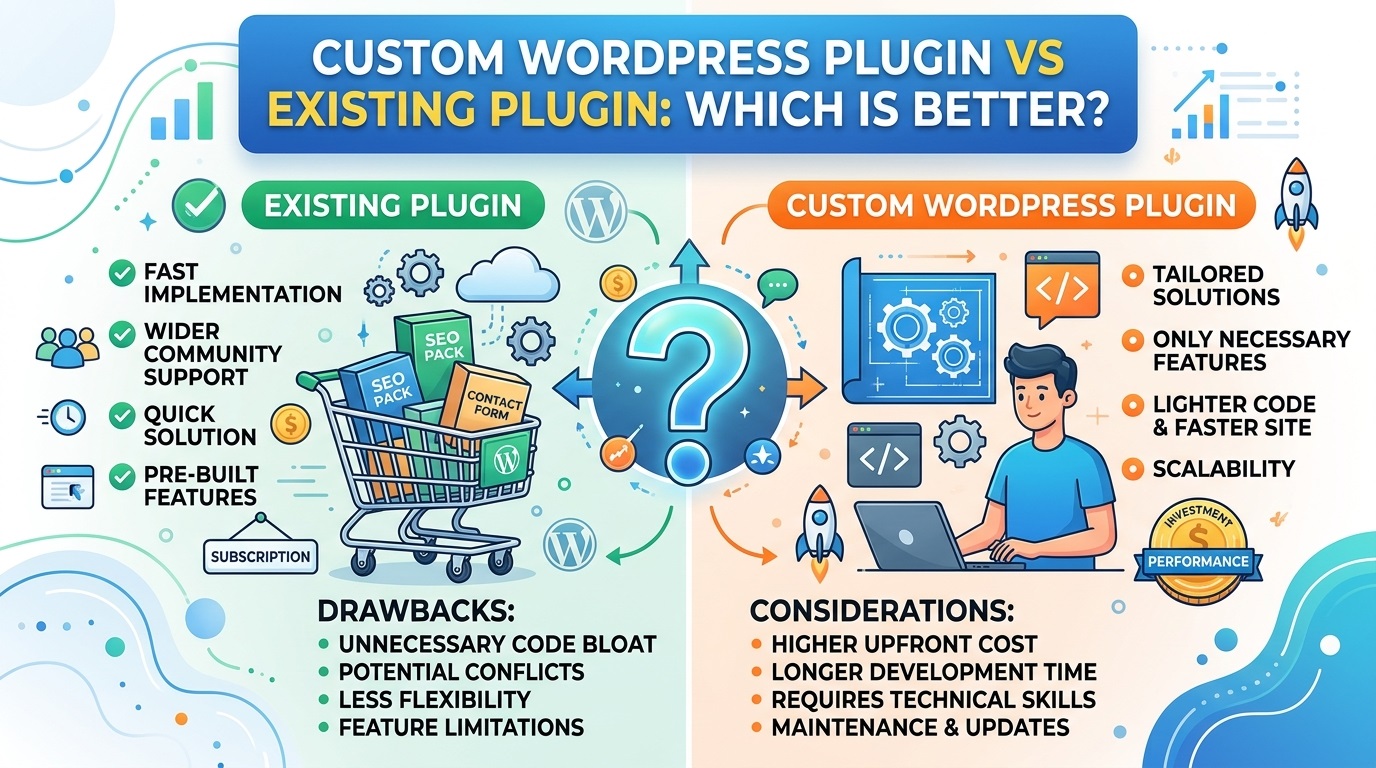
However, a common question arises when a website needs a specific feature: Should you use an existing WordPress plugin or invest in custom WordPress plugin development?
Both approaches have advantages and disadvantages. Existing plugins can save time and reduce initial development costs, while custom WordPress plugins can provide greater control, specialized functionality, and a solution tailored to a website’s exact requirements.
The right choice depends on several factors, including your budget, technical requirements, website complexity, security expectations, future growth, and available maintenance resources.
In this guide, we will compare custom WordPress plugins with existing plugins, explain when each option makes sense, and help you determine which approach is best for your website.
What Is an Existing WordPress Plugin?
An existing WordPress plugin is a software extension that has already been developed to provide particular functionality. Website administrators can install and configure it instead of creating the same functionality themselves.
Thousands of free and commercial plugins are available through the official WordPress Plugin Directory, while additional products are offered by independent developers and software companies.
Examples of common plugin categories include:
- Contact forms and lead-generation tools
- Image sliders and logo carousels
- Search engine optimization tools
- Website backups and migration utilities
- Security and firewall solutions
- Caching and performance optimization
- E-commerce functionality
- Membership and subscription management
- Analytics and reporting
- Social media integrations
For example, a business website that needs a contact form can install an established form plugin rather than commission a developer to build a complete form management system.
Similarly, a website owner who wants to display a responsive image carousel may find an existing slider plugin that supports the required layout, navigation, and mobile responsiveness.
The main advantage of an existing plugin is that much of the development work has already been completed. However, its suitability depends on the quality of its code, compatibility, maintenance history, licensing, and ability to meet your specific requirements.
What Is a Custom WordPress Plugin?
A custom WordPress plugin is a software extension developed specifically for a website, organization, business process, or specialized requirement.
Instead of selecting a ready-made solution and adapting its settings, a developer creates functionality according to a defined set of requirements.
A custom plugin might be developed to:
- Display business-specific information on a website
- Connect WordPress to an internal business application
- Automate repetitive administrative tasks
- Generate specialized reports
- Provide a unique frontend interface
- Create custom post types and administration screens
- Integrate a third-party API using specific business rules
- Extend WooCommerce with specialized checkout or order-processing functionality
- Implement custom user roles, permissions, or workflows
For example, a logistics company may need a WordPress dashboard that displays shipment information from its internal system. If existing plugins cannot provide the required integration and workflow, a custom plugin may be the most suitable solution.
Custom development can also be appropriate when an existing plugin offers most of the required functionality but lacks one essential feature that cannot be added safely through supported extension mechanisms.
Developers should follow the WordPress Plugin Developer Handbook to understand plugin architecture, security, hooks, administration interfaces, and other development practices.
The main benefit of custom development is control over the functionality and implementation. The trade-off is that the plugin must be designed, tested, documented, and maintained.
Custom WordPress Plugin vs Existing Plugin: Key Differences
Although both approaches extend WordPress functionality, they differ in important ways.
| Comparison factor | Existing plugin | Custom plugin |
|---|---|---|
| Initial cost | Often free or relatively affordable | Usually requires a development budget |
| Development time | Generally short | Depends on project complexity |
| Customization | Limited to available options and supported extensions | Can be tailored to defined requirements |
| Feature availability | Features may already be available | Features must be developed |
| Performance | Depends on plugin quality and implementation | Can be optimized for the intended use case |
| Security | Depends on developer practices and maintenance | Depends on development quality and ongoing maintenance |
| Compatibility | Must be checked against the website environment | Must be tested against the target environment |
| Maintenance | May be handled by the plugin vendor | Requires an agreed maintenance arrangement |
| Updates | Supplied by the plugin developer | Must be managed by the owner or developer |
| Ownership | Governed by the plugin’s license and terms | Governed by the development contract and applicable licenses |
| Scalability | Depends on architecture and available extension points | Can be designed around expected future requirements |
Neither option is automatically superior. A well-maintained existing plugin may be more reliable than a poorly developed custom solution. Conversely, a carefully engineered custom plugin may be a better fit than a large, complicated plugin that provides many unnecessary features.
The objective is to select the solution that delivers the required functionality with an acceptable total cost of ownership.
1. Cost Comparison: Which Option Is More Affordable?
Cost is often the first factor website owners consider when choosing between a custom WordPress plugin and an existing plugin.
The cost of existing plugins
Many existing plugins are free to install. Others offer premium versions with additional features, technical support, integrations, or advanced configuration options.
A free plugin can be an excellent choice for a small business website that needs a standard feature. A premium plugin may also be more affordable than developing equivalent functionality from scratch.
However, the purchase price does not necessarily represent the complete cost. You may need to pay for annual renewals, additional extensions, premium support, usage-based services, or developer assistance.
Some plugins may also require paid upgrades to unlock features that are essential to your project.
The cost of custom plugin development
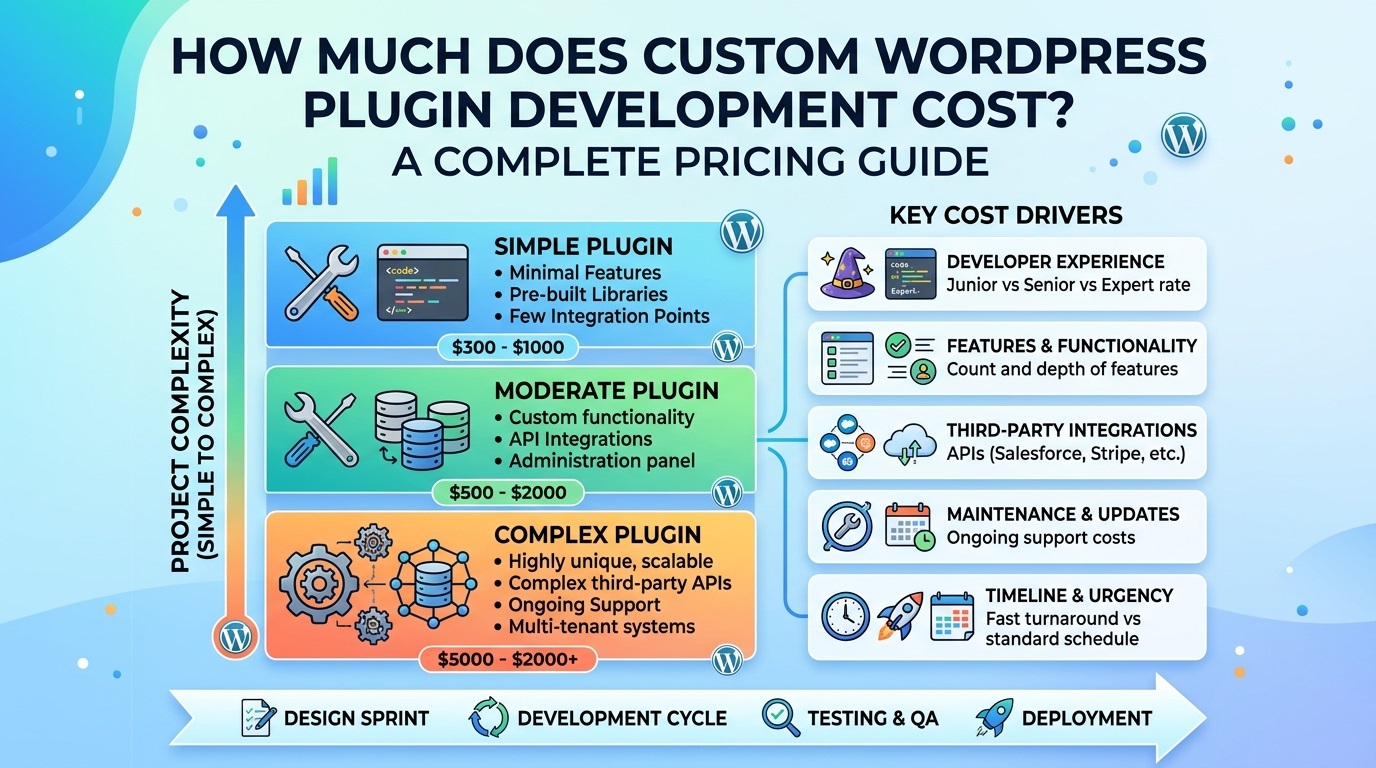
Custom plugin development usually involves an initial investment in requirements analysis, architecture, programming, testing, deployment, and documentation.
The total cost depends on factors such as:
- Number and complexity of features
- User interface and administration requirements
- Third-party API integrations
- Authentication and permission rules
- Data storage and processing requirements
- Security and performance testing
- Documentation and training
- Ongoing maintenance expectations
A simple shortcode plugin may require relatively little work, while a plugin that integrates multiple business systems may involve substantial development.
Custom development also introduces responsibility for future maintenance. WordPress core updates, PHP changes, external API changes, and evolving business requirements can all require additional work.
Which is better financially?
An existing plugin is generally preferable when it satisfies your requirements without extensive workarounds or recurring add-on costs.
Custom development becomes more attractive when existing plugins require multiple paid extensions, expensive recurring licenses, complicated workarounds, or substantial customization that is difficult to maintain.
Compare total cost of ownership rather than the initial price alone. Include licenses, development, configuration, support, updates, troubleshooting, and future changes when evaluating both approaches.
2. Customization and Flexibility
Customization is one of the most important differences between the two options.
Customization with existing plugins
Established plugins often provide settings that allow users to adjust colors, layouts, text, permissions, display conditions, and other options.
This is sufficient for many websites. A standard contact form, for example, usually does not need to be developed from scratch simply because the website owner wants different field labels or button colors.
However, limitations appear when a plugin does not support a required workflow. You may be unable to change its behavior without using hooks, filters, a supported extension, or additional development.
Modifying the plugin’s original files directly is generally a poor long-term solution because updates can overwrite those changes.
Customization with a custom plugin
A custom plugin can be designed around the exact requirements of your website. Its administration screens, data structures, frontend output, permissions, integrations, and business rules can be tailored to the project.
For example, a real estate website may need a property search system with custom filters, agent-specific permissions, and a connection to an external property database.
If existing solutions cannot provide the required combination, a custom plugin may offer a more maintainable approach.
However, flexibility has a cost. Every additional feature creates more code to test, document, secure, and maintain.
Which option provides better flexibility?
Custom development generally offers greater control, while existing plugins are often better for common features with well-defined requirements.
Before commissioning a custom plugin, check whether the existing plugin supports the required behavior through its documented settings, hooks, filters, or official extensions.
3. Performance and Website Speed
Website performance affects usability, conversion rates, and the overall experience of visitors. Plugin selection can influence loading times, database queries, server resource consumption, and frontend rendering.
Nevertheless, it is inaccurate to assume that every existing plugin is slow or every custom plugin is fast.
Performance of existing plugins
A well-engineered plugin can provide sophisticated functionality efficiently. Established products may benefit from extensive testing, performance improvements, and experience across different WordPress environments.
Problems can arise when a plugin loads scripts and styles on pages where they are unnecessary, performs expensive database queries, repeatedly calls external services, or includes functionality that your website does not use.
Installing numerous overlapping plugins may also increase complexity and resource consumption, although the actual impact depends on what each plugin does.
Performance of custom plugins
Custom development allows a developer to focus on the required features and avoid unnecessary functionality.
For example, a small plugin that displays a carefully cached set of business statistics may be simpler than adopting a broad reporting platform when only one specific report is required.
However, custom code can introduce inefficient queries, excessive HTTP requests, memory problems, or poorly implemented caching if it is not engineered properly.
How to make the right decision
Evaluate the actual performance of the proposed solution rather than relying on assumptions.
Useful resources include the WordPress performance handbook and Google PageSpeed Insights.
Test important pages before and after installation. Where relevant, assess database activity, frontend assets, server response times, caching behavior, and Core Web Vitals.
Choose custom development when you have specific performance requirements that existing solutions cannot meet efficiently—not simply because custom code sounds faster.
4. Security and Reliability
Security is essential for any WordPress website, particularly when plugins handle user accounts, personal information, payments, uploaded files, or administrative operations.
Security considerations for existing plugins
An established plugin can benefit from a dedicated development team, security reviews, user reports, and regular releases. However, popularity does not guarantee security.
Before installing a plugin, investigate its maintenance history, compatibility, documentation, support channels, permissions, and known vulnerabilities.
Useful checks include:
- Reviewing its WordPress Plugin Directory listing
- Checking its changelog and recent updates
- Looking for credible security advisories
- Reviewing its support forum for unresolved problems
- Confirming that the plugin comes from a trustworthy source
- Checking whether its required permissions are appropriate
An abandoned plugin may continue working for a time, but unpatched vulnerabilities and compatibility issues can become serious risks.
Security considerations for custom plugins
Custom development gives you control over the code and the security requirements, but that control does not automatically make the plugin safer.
Developers must validate and sanitize incoming data appropriately, escape output, enforce authorization, use nonces where appropriate, and apply least-privilege principles.
For database operations, developers should use appropriate WordPress APIs and prepared queries where required. REST API routes should include suitable permission checks.
The WordPress Plugin Security guidance explains these responsibilities in detail.
Custom plugins also need a process for reviewing dependencies, correcting vulnerabilities, testing updates, and responding to security reports.
Which option is more secure?
Either approach can be secure when implemented and maintained properly.
For common functionality, a reputable, actively maintained plugin may offer a stronger practical choice than commissioning an inexperienced developer to recreate the same feature.
For specialized requirements, a professionally developed custom plugin can provide a secure solution when its architecture, permissions, input handling, testing, and maintenance are properly managed.
Security should be assessed through evidence and engineering practices, not through the label “custom” or “existing.”
5. Compatibility With WordPress Themes, PHP, and Other Plugins
Compatibility determines whether a plugin works correctly within your existing website environment.
A plugin may function perfectly on one WordPress installation but experience errors on another because of differences in PHP versions, theme behavior, other plugins, server configuration, or available dependencies.
Existing plugin compatibility
Established plugins may support a range of WordPress and PHP versions, but support must be verified for your actual environment.
Before installation, review the plugin’s compatibility information, changelog, documentation, and support discussions. Test important functionality on a staging website before updating a production site.
Pay particular attention to plugins that interact with the same features, such as caching, checkout, forms, user authentication, or database records.
Custom plugin compatibility
A custom plugin can be developed for a specific WordPress environment, but it should not be designed so narrowly that routine updates become difficult.
Professional development should account for supported PHP versions, WordPress APIs, theme independence, error handling, and interactions with other installed extensions.
For example, a custom image carousel should work with the intended theme without requiring modifications to the theme’s core files.
The developer should also test activation, deactivation, configuration, frontend display, and relevant failure conditions.
Which approach is better?
Existing plugins may be preferable when they already support your website’s environment and required integrations.
Custom plugins are useful when you need specialized compatibility behavior or when existing solutions repeatedly conflict with your theme or other essential software.
In either case, compatibility testing should be part of the selection or development process.
6. Maintenance, Updates, and Long-Term Support
A WordPress plugin is not a one-time installation that can always be ignored. It may require updates as WordPress, PHP, third-party services, and your website’s requirements change.
Maintaining an existing plugin
The original developer generally manages bug fixes, compatibility updates, and feature improvements.
This can reduce the workload for website owners, especially when the plugin is actively maintained and the vendor provides reliable support.
However, you depend on the developer’s continued commitment. A plugin might be discontinued, sold to a new owner, or changed in ways that affect your website.
Premium products may also require active licenses for updates and support.
Before adopting an existing plugin for a critical business process, investigate its maintenance record and consider how you would migrate if support ended.
Maintaining a custom plugin
A custom plugin requires an ongoing maintenance arrangement.
Depending on the project, maintenance may include:
- Fixing bugs and addressing security issues
- Testing compatibility with WordPress and PHP updates
- Updating third-party API integrations
- Improving performance
- Correcting issues reported by users
- Updating documentation
- Adding new business requirements
- Testing backup and restoration procedures
Custom development can be easier to control when you have access to the source code, documentation, and a qualified developer.
Nevertheless, relying on a single developer without documentation or a handover plan creates risk. If that person becomes unavailable, another developer may need time to understand the code.
Which approach is better for maintenance?
An actively maintained existing plugin usually reduces direct maintenance responsibility.
A custom plugin can provide greater control over release schedules and feature priorities, but you must budget for ongoing support.
For business-critical functionality, define who owns maintenance, how quickly problems should be addressed, and how updates will be tested before deployment.
7. Scalability and Future Business Growth
A website that serves a small audience today may require more advanced features as its business grows.
Scalability involves more than handling additional visitors. It also includes supporting more data, additional user roles, new integrations, complex workflows, and changing operational requirements.
Scaling with existing plugins
Established plugins may already include features for larger websites, including caching, integrations, role-based permissions, and reporting.
Some products offer different pricing tiers or extensions that allow functionality to grow over time.
However, a plugin may become restrictive when your business requires workflows that its developers did not anticipate.
Combining multiple extensions to overcome those limitations can increase maintenance complexity.
Scaling with custom plugins
Custom development allows you to plan around anticipated growth. A developer can establish appropriate data structures, modular components, integration boundaries, and extension points.
For example, a membership website might begin with basic subscription management but later need organization accounts, custom reporting, and integration with an external customer relationship management system.
A custom plugin can be structured to support these requirements if they are considered during architecture and development.
However, designing for hypothetical future needs can increase costs unnecessarily. Overengineering a simple website is rarely beneficial.
Which option is better for scalability?
Use an existing plugin when its architecture and supported features meet your foreseeable needs.
Consider custom development when your business has specific growth requirements that cannot be handled reliably through existing functionality.
Choose a solution that accommodates realistic future plans without paying for unnecessary complexity today.
8. Ownership, Licensing, and Vendor Dependency
Ownership is another important consideration, especially for businesses investing in specialized functionality.
Existing plugin licensing
A free plugin is not necessarily public domain software. Its license determines how it can be used, modified, and redistributed.
Many WordPress plugins are distributed under the GNU General Public License or compatible terms, while commercial products may also involve subscription agreements, trademarks, hosted services, or additional contractual conditions.
Read the relevant license and terms before making assumptions about your rights.
You should also identify whether the plugin depends on a remote service that could stop operating or change its pricing.
Custom plugin ownership
A custom development agreement should clearly explain who owns the code, what usage and modification rights the client receives, and whether the developer may reuse general-purpose components.
It should also specify the treatment of third-party libraries, premium dependencies, API credentials, documentation, and source-code delivery.
Payment for development does not automatically resolve every ownership question. The contract and applicable law matter.
If the plugin is essential to your business, ensure that you can obtain the source code, arrange maintenance, and migrate the solution if the original developer is no longer available.
Which option is better for ownership?
An existing plugin may provide sufficient rights and flexibility under its license.
Custom development can provide a more tailored ownership arrangement, provided the agreement clearly defines the rights being transferred or licensed.
Review licensing and contractual terms before committing to either approach.
9. Ease of Installation and Configuration
Time to implementation matters, particularly for small businesses and website owners who do not have a dedicated development team.
Installing an existing plugin
Most WordPress repository plugins can be installed from the administration dashboard.
The usual process is to open Plugins → Add New Plugin, search for a suitable product, install it, activate it, and configure its settings.
Commercial plugins may require downloading a ZIP file, uploading it through the dashboard, entering a license key, or completing additional setup steps.
Although installation is often straightforward, configuration can become difficult when the plugin has extensive options or requires several integrations.
Installing a custom plugin
A custom plugin must first be developed and tested. The finished ZIP package can then be installed through the WordPress dashboard or deployed using an appropriate development workflow.
Its installation process may be simple, but the development phase can take substantially longer than installing an existing product.
Good documentation should explain prerequisites, installation, configuration, common errors, and upgrade procedures.
Which approach is easier?
An existing plugin is usually faster when the required functionality is already available.
Custom development is appropriate when the implementation effort is justified by the value of obtaining a precise solution.
10. When Should You Choose an Existing WordPress Plugin?
An existing plugin is generally the better choice when your requirements match established functionality and the available product is trustworthy, maintained, and compatible.
Consider using an existing plugin when:
You need a common feature. Contact forms, backups, SEO tools, and basic image sliders are examples of functionality for which established solutions may already exist.
Your budget is limited. A suitable free or affordable plugin can reduce the initial investment.
You need a quick implementation. Installing and configuring an existing solution is often much faster than developing a new one.
The plugin is actively maintained. Reliable updates, clear documentation, and responsive support can make it a practical long-term choice.
You do not want to manage custom code. An existing plugin can reduce your direct responsibility for development and testing.
The available features meet your requirements. If the plugin does everything you need without major workarounds, custom development may offer little additional value.
Before deciding, evaluate the product carefully. Avoid installing several plugins that perform overlapping functions without a clear reason.
11. When Should You Choose a Custom WordPress Plugin?
Custom development is more appropriate when your requirements are specific, valuable, and difficult to satisfy through existing products.
Consider a custom WordPress plugin when:
You need unique functionality. Your website requires a feature that is not available in suitable existing plugins.
You have specialized business rules. Standard plugins cannot represent your workflow, permissions, calculations, or approval process.
You require a specific integration. Your business application or external API needs a customized connection.
Existing plugins create unnecessary complexity. Multiple extensions or workarounds are becoming difficult to maintain.
You need a tailored administration interface. Your team needs a focused dashboard with particular settings, reports, or actions.
You need greater control over development priorities. Your business requires specific improvements and a defined release process.
The functionality provides a competitive advantage. A specialized feature may improve efficiency, customer experience, or the way your business delivers its services.
Custom development should begin with a clearly defined problem, not simply the assumption that a custom solution must be better.
12. A Third Option: Customize an Existing Plugin
The choice is not always limited to installing a plugin exactly as supplied or building a completely new one.
A third approach is to customize an existing plugin through supported extension points.
Depending on the product, a developer may be able to use WordPress hooks and filters, documented APIs, custom add-ons, or a separate companion plugin.
For example, an existing carousel plugin might already provide responsive slides, navigation controls, and image management. If you only need a specialized display rule, a small extension may be more practical than rebuilding the entire carousel.
This approach can preserve the benefits of established functionality while addressing a limited gap.
However, customization should respect the original plugin’s architecture and licensing terms. Directly editing the vendor’s files can cause changes to disappear during updates.
Before choosing this route, confirm that the necessary extension points are supported and that your customization can be tested after updates.
13. How to Decide: A Practical Evaluation Checklist
Use the following checklist before choosing an existing or custom WordPress plugin.
- Define the exact problem the plugin must solve.
- Separate essential features from optional features.
- Search the official WordPress Plugin Directory and reputable commercial providers.
- Review maintenance history, documentation, compatibility, and support.
- Confirm whether the plugin requires paid extensions or recurring subscriptions.
- Check security requirements and the sensitivity of the data being processed.
- Test suitable candidates on a staging website.
- Estimate development, licensing, maintenance, and future upgrade costs.
- Determine whether customization is possible through supported APIs or hooks.
- Document ownership, source-code access, and support responsibilities.
- Consider a migration plan if the plugin is discontinued or no longer meets your needs.
Once you have completed these checks, compare the realistic alternatives rather than choosing based on price or feature count alone.
Example: Choosing a plugin for an image carousel
Imagine that a business website needs a responsive image carousel with autoplay, navigation arrows, touch support, and basic styling controls.
If a maintained existing plugin provides all these features and works with the website’s theme, installing it is likely the most economical option.
Now imagine that the same website requires a carousel connected to an internal product database, with custom approval rules, user-specific slides, and reporting.
If suitable plugins cannot provide these capabilities, a custom plugin or a carefully designed extension may be justified.
The difference is not the type of website. It is the gap between the required functionality and what available solutions can reliably provide.
14. Common Mistakes to Avoid
Website owners can make costly decisions when selecting plugins without evaluating their long-term consequences.
Choosing only by price
A free plugin may be sufficient, but it may also lack essential features or require paid extensions. A custom solution may have a higher initial cost but provide better value for a specialized requirement.
Compare the total cost of ownership.
Assuming custom plugins are always faster
Performance depends on code quality, architecture, queries, caching, and the way features are implemented. A poorly developed custom plugin can be slower than a reputable existing solution.
Installing too many plugins
Every additional plugin introduces code, dependencies, and possible maintenance requirements. Avoid installing multiple products that duplicate the same functionality.
At the same time, do not assume that fewer plugins automatically mean better performance. Evaluate their actual behavior.
Ignoring update and maintenance requirements
An apparently successful plugin can become incompatible or vulnerable if it is not maintained. Establish a process for reviewing updates, testing changes, and resolving issues.
Modifying plugin files directly
Changes to a third-party plugin’s original files can be lost during updates and make troubleshooting harder. Use documented hooks, filters, supported extensions, or a separate custom plugin whenever possible.
Failing to test before deployment
A plugin may behave differently on a production website because of its theme, caching, user permissions, PHP environment, or other extensions. Use staging tests and backups to reduce deployment risks.
Neglecting documentation
Custom functionality should be documented so that another developer can maintain it. Existing plugins should also have clear setup instructions and a reliable source for support.
15. Best Practices for Successful WordPress Plugin Selection
Regardless of which approach you choose, a structured process helps reduce technical and financial risks.
Start with requirements. Describe what the plugin must do, who will use it, what data it will process, and which systems it must integrate with.
Research existing solutions. Search for established products before commissioning new development. Review documentation and test realistic candidates.
Prioritize security. Check permissions, input handling, output escaping, dependencies, update history, and the sensitivity of stored data.
Test compatibility. Evaluate the solution against your WordPress version, PHP environment, theme, and other important plugins.
Measure performance. Use relevant testing tools and representative pages rather than assuming that a solution is efficient.
Plan for maintenance. Assign responsibility for updates, troubleshooting, security fixes, and compatibility testing.
Keep functionality separate from presentation where appropriate. A well-structured custom plugin should avoid unnecessary dependence on a particular theme.
Use documented WordPress APIs. Follow established development practices described in the WordPress Plugin Developer Handbook instead of reinventing functionality that WordPress already provides.
Protect your data. Maintain reliable backups and test restoration procedures before significant changes.
Review the solution periodically. Business needs and software environments change. Reassess whether your current plugin still meets your requirements.
These practices make plugin decisions more predictable and help prevent avoidable problems as your website grows.
Frequently Asked Questions
Is a custom WordPress plugin better than an existing plugin?
A custom WordPress plugin is better when you need specialized functionality, unique business rules, or control that suitable existing plugins cannot provide. An existing plugin is often better for standard features that are already supported by a reliable product.
Is custom WordPress plugin development expensive?
Custom plugin development usually requires a higher initial investment because the functionality must be designed, programmed, tested, and documented. The cost depends on complexity, integrations, security requirements, and maintenance expectations.
Are existing WordPress plugins safe to use?
Many existing plugins are suitable for production websites, but safety depends on their code quality, maintenance, permissions, dependencies, and update history. Review these factors before installing a plugin, and keep it updated.
Can I customize an existing WordPress plugin?
Yes. Depending on the plugin, you may be able to use settings, hooks, filters, documented APIs, or custom add-ons. Avoid modifying the original plugin files directly unless you have a specific, controlled reason and a reliable update strategy.
Do custom WordPress plugins improve website speed?
They can improve performance when they eliminate unnecessary functionality or implement a specific workflow efficiently. However, poorly written custom code can create performance problems. Testing is necessary to establish the actual impact.
Who maintains a custom WordPress plugin?
Maintenance is generally handled by the website owner, an in-house developer, or a contracted development company. Responsibilities should be defined before the plugin is delivered.
Can I switch from an existing plugin to a custom plugin later?
Yes, but migration may require transferring settings, content, metadata, user information, or other stored data. Plan the migration carefully and test it on a staging environment before replacing a production plugin.
Should small businesses develop custom WordPress plugins?
Most small businesses should first investigate existing solutions for standard features. Custom development becomes worthwhile when the required functionality is unavailable, existing solutions create significant operational problems, or a specialized feature provides enough business value to justify the investment.
Conclusion: Which Is Better for Your Website?
The comparison between a custom WordPress plugin and an existing plugin does not have one universal answer. Both approaches can deliver reliable, secure, and effective functionality when selected and implemented correctly.
Choose an existing WordPress plugin when it meets your requirements, is actively maintained, works with your website, and offers an acceptable total cost of ownership. This approach is generally practical for common features and projects that need a fast implementation.
Choose a custom WordPress plugin when you need specialized functionality, complex business rules, a tailored integration, or greater control over the implementation. Make sure you account for development costs, testing, documentation, and long-term maintenance.
Consider customizing an existing plugin when a reputable solution already provides most of the required functionality and only a limited gap needs to be addressed.
The best decision begins with a clear understanding of your website’s needs. Compare available solutions, evaluate their limitations, assess the risks, and estimate long-term costs before committing to a particular approach.
If your website requires a feature that existing plugins cannot provide reliably, professional WordPress plugin development can help turn that requirement into a maintainable solution designed around your business.
The ultimate goal is not to install the largest number of plugins or write the most custom code. It is to choose the simplest reliable solution that meets your requirements today and remains practical to maintain tomorrow.
Leave a Reply